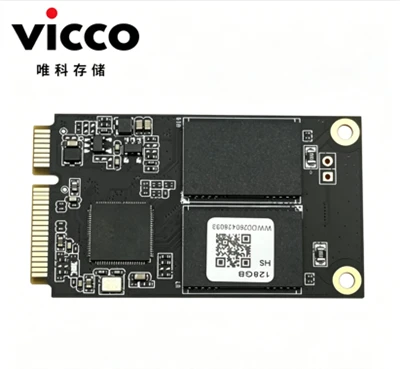
SSD Solid State Drive


An SSD, or solid-state drive, is a type of storage device used in computers. This non-volatile storage media stores persistent data on solid-state flash memory. SSDs replace traditional hard disk drives (HDDs) in computers and perform the same basic functions as a hard drive. But SSDs are significantly faster in comparison. With an SSD, the device's operating system will boot up more rapidly, programs will load quicker and files can be saved faster.A traditional hard drive consists of a spinning disk with a read/write head on a mechanical arm called an actuator.


SSDs offer shorter boot times for your computer, more immediate data transfer and higher bandwidth. Faster speeds mean SSDs can handle data at the ultra-high speeds necessary in today's business world, especially when running programs that access large amounts of data such as an operating system. Also, SSDs are very stable, which ensures that stored data is secure.


Trang chủ 12 Trang cuối 1/2

 
Nvme Ssd


ODM SSD
USB FLASH DRIVE 3.0
 

Our professional team collaborate and communicate effectively with one another, and are committed to delivering high-quality results. They are capable of handling complex challenges and projects that require their specialized expertise and experience.


USB FLASH DRIVE 2.0


2.5-Inch Sata Ssd

This is the most common SSD type and should be compatible with the widest range of PCs, even old ones. "2.5-Inch" refers to the form factor of the SSD enclosure, 2.5-inch SSDs use SATA bandwidth and connectors. Because of this, they should be compatible with any PC or laptop that's already using a hard drive.

M.2 Sata Ssd

M.2 drives can come in a few different sizes, but the main standard is M.2 2280. The "22" means that the M.2 drive is 22 millimeters wide, whereas the "80" means that the M.2 drive is 80 millimeters long.If you aren't sure how to quantify this, just think of M.2 drives as extremely thin USB thumb drives they're about that length, usually.

productcate-731-563
productcate-733-554

M.2 Nvme Ssd

NVMe SSDs exclusively use the M.2 form factor discussed above, but with a catch: they are no longer using SATA bandwidth.NVMe SSDs can achieve industry-leading storage performance while remaining extremely compact and straightforward to install.

It can deliver up to 3,500 MB/s read and 3,000 MB/s write speeds, which means that you can expect lightning-fast boot times, quick file transfers, and snappy application launches.


Good Die SSD

SSD PCBA

Otg Mudp

Software written and stored in electrically erasable memory for execution by the controller. Can be upgraded once in service.Some advanced techniques include NCQ, TRIM, and wear leveling.It manages data transfer, error correction, wear-leveling, and other functions.

USB PCBA

Individual Flash die or devices using either NAND or NOR technology. Densities vary from 2GBytes to 64GBytes.These are memory chips that store data. They are made up of floating-gate transistors and use electric charges to store and retrieve data.SSDs may use SATA, PCIe, or M.2 connectors to connect to the computer.


Companies depending on programming environments or data analysis often rely on SSDs, as access times and file-transfer speeds are critical.SSDs are used in personal computers and laptops as a primary storage device. They offer faster boot and load times, and improve overall system performance.


USB FLASH DRIVE 3.0 PCBA


SSD (Solid State Drive) works by storing data on non-volatile flash memory chips or RAM modules. Unlike traditional hard drives, which use spinning magnetic platters to store and retrieve data, SSDs have no moving parts. Because the drive heads must align over an area of the disk in order to read or write data, and the disk is constantly spinning, there's a delay before data can be accessed. The drive may need to read from multiple locations in order to launch a program or load a file, which means it may have to wait for the platters to spin into the proper position multiple times before it can complete the command. If a drive is asleep or in a low-power state, it can take several seconds more for the disk to spin up to full power and begin operating.The hard drive industry introduced smaller platters, on-disk memory caches, and faster spindle speeds to counteract this trend, but mechanical drives can only spin so fast.


The ideal file types that should be stored on an SSD are ones that need to be accessed quickly and frequently. Operating system files and program files are perfect for this. In a world of Netflix and Spotify, storing large files like movies or your music collection on your hard drive are a thing of the past. Storing files like these on an SSD not only takes up what little space it may have, but also will see no performance gain. It is not a good idea to store your media collection on a solid-state drive, as you will not notice if your media files are played from an HDD or SSD.


productcate-311-437
productcate-311-439
productcate-311-439


A: A solid-state drive (SSD) is a new generation of storage device used in computers. SSDs store data using flash-based memory, which is much faster than the traditional hard disks they've come to replace.

Q: Is a 256GB SSD better than a 1TB hard drive?

A: An SSD offers faster read/write speeds, consumes less power, generates less heat, and is more shock-resistant. On the other hand, a 1TB HDD provides a much larger storage capacity at a lower cost. So, the choice depends on your specific needs.

A: The lifespan of an SSD is significantly longer than that of an HDD. While HDDs tend to last around 3-5 years, SSDs can last up to 10 years or more. This is because SSDs have no moving parts, whereas HDDs have spinning disks that can wear down over time.

A: It differs a lot if you just want to install your operating system on the SDD or if you actually want to work from the drive. 250GB: operating system, entertainment, and backups. 500GB: entertainment and business use. 1TB: business use, gaming, and photography.

A: It really depends on the laptop size. Some houses a 2.5″ drive and M2 SSD (Note: there are different types of M2 SSDs) and some houses a single M2 or even double. There are those mSata drive that do exist for ultrabooks.

A: That's the power of an SSD. SSDs also enable "instant-on" performance — the ability for your system to boot almost immediately. Because SSDs don't have to mechanically seek out data on a moving platter (as a hard drive does), they help your system achieve instant-on performance.

Q: Can SSD last 20 years?

A: While it's theoretically possible for an SSD to last 20 years, it's highly unlikely in real-world scenarios. Most consumer-grade SSDs are designed with an endurance rating that specifies the total amount of data that can be written to the drive before it starts to degrade.

A: Use a USB cord to connect the external enclosure with the SSD to your laptop. Windows should automatically detect your external SSD. If Windows doesn't detect the SSD drive, press Win+X, then click "Disk Management". Right-click the SSD drive and click "Initialize disk".

A: Both SSDs and HDDs are permanent storage media for electronic devices, and both are types of non-volatile memory. That means they retain your files even when the system's power is turned off.

A: Solid-state drives (SSDs) consist of NAND flash memory cells and a controller that manages the structure of data on the drive. The memory cells store information by trapping electrical charge. Data is stored on SSDs in pages, which are combined to form blocks​.


We're well-known as one of the leading ssd solid state drive enterprises in China, specialized in providing high quality OEM service. Please rest assured to wholesale bulk high-grade ssd solid state drive at competitive price from our factory.

(0/10)

clearall